<?xml version="1.0" encoding="UTF-8"?>
<rdf:RDF xmlns:rdf="http://www.w3.org/1999/02/22-rdf-syntax-ns#" xmlns:ref="http://purl.org/rss/1.0/modules/reference/" xmlns:dc="http://purl.org/dc/elements/1.1/" xmlns="http://purl.org/rss/1.0/">
	<channel rdf:about="https://myvpn.work/rss.rdf">
		<title>MyVPN.work</title>
		<link>https://myvpn.work/index.php</link>
		<description><![CDATA[Copyright © MyVPN.work]]></description>
		<items>
			<rdf:Seq>
				<rdf:li resource="https://myvpn.work/index.php?entry=entry260821-191434" />
				<rdf:li resource="https://myvpn.work/index.php?entry=entry260802-204047" />
				<rdf:li resource="https://myvpn.work/index.php?entry=entry260801-223914" />
			</rdf:Seq>
		</items>
	</channel>
	<item rdf:about="https://myvpn.work/index.php?entry=entry260821-191434">
		<title>Explore the Global Network with Ease! MyVPN macOS / iOS Quick Connection Guide</title>
		<link>https://myvpn.work/index.php?entry=entry260821-191434</link>
		<description><![CDATA[<h1 style="border: none; padding: 0cm;"><font color="#007bff">Explore the Global Network with Ease! MyVPN macOS / iOS Quick Connection Guide</font></h1>
<p class="subtitle"><font color="#6c757d">Bypass restrictions smoothly with Apple's native security framework—no complex setup required.</font></p>

<h2 style="margin-top: 0.79cm; margin-bottom: 0.79cm; border-top: none; border-bottom: none; border-left: 2.50pt solid #007bff; border-right: none; padding-top: 0cm; padding-bottom: 0cm; padding-left: 0.26cm; padding-right: 0cm; widows: 2; orphans: 2;">
    <font color="#343a40" face="apple-system, BlinkMacSystemFont, Segoe UI, Roboto, Helvetica Neue, Arial, sans-serif" size="4">🛠️ Preparation Before Connection</font>
</h2>

<p style="margin-top: 0.79cm; margin-bottom: 0.79cm; border: 1px solid #e9ecef; padding: 0.53cm; font-style: normal; font-weight: normal; widows: 2; orphans: 2;">
    <font color="#343a40" face="apple-system, BlinkMacSystemFont, Segoe UI, Roboto, Helvetica Neue, Arial, sans-serif" size="4"><span style="background: #f8f9fa;">Before you begin, please ensure you have obtained the following required configuration profile:</span></font>
</p>

<ul>
    <li style="margin-bottom: 0.26cm; border: none; padding: 0cm; widows: 2; orphans: 2;">
        <strong><font color="#343a40" face="apple-system, BlinkMacSystemFont, Segoe UI, Roboto, Helvetica Neue, Arial, sans-serif" size="4"><span style="background: #f8f9fa;">1. Connection Profile: </span></font></strong>
        <font color="#343a40" face="apple-system, BlinkMacSystemFont, Segoe UI, Roboto, Helvetica Neue, Arial, sans-serif" size="4"><span style="background: #f8f9fa;">Obtain the </span></font>
        <code><font color="#343a40" face="apple-system, BlinkMacSystemFont, Segoe UI, Roboto, Helvetica Neue, Arial, sans-serif" size="4"><span style="background: #f8f9fa;">vpnclient.mobileconfig</span></font></code>
        <font color="#343a40" face="apple-system, BlinkMacSystemFont, Segoe UI, Roboto, Helvetica Neue, Arial, sans-serif" size="4"><span style="background: #f8f9fa;"> Apple-specific configuration profile generated by our site.</span></font>
    </li>
    <li style="margin-top: 0.13cm; margin-bottom: 0.26cm; border: none; padding: 0cm; widows: 2; orphans: 2;">
        <strong><font color="#343a40" face="apple-system, BlinkMacSystemFont, Segoe UI, Roboto, Helvetica Neue, Arial, sans-serif" size="4"><span style="background: #f8f9fa;">2. Native Support (No App Required): </span></font></strong>
        <font color="#343a40" face="apple-system, BlinkMacSystemFont, Segoe UI, Roboto, Helvetica Neue, Arial, sans-serif" size="4"><span style="background: #f8f9fa;">macOS and iOS have full, built-in VPN support. There is no need to download third-party software like strongSwan from the App Store. Simply tap the profile below to automatically configure your settings.</span></font>
    </li>
</ul>

<h1 style="border: none; padding: 0cm;"><font color="#007bff">輕鬆探索全球網路！MyVPN 手機端 macOS / iOS 快速連線指南</font></h1>
<p class="subtitle"><font color="#6c757d">免去繁瑣設定，使用 Apple 原生安全架構流暢翻牆</font></p>

<h2 style="margin-top: 0.79cm; margin-bottom: 0.79cm; border-top: none; border-bottom: none; border-left: 2.50pt solid #007bff; border-right: none; padding-top: 0cm; padding-bottom: 0cm; padding-left: 0.26cm; padding-right: 0cm; widows: 2; orphans: 2;">
    <font color="#343a40" face="apple-system, BlinkMacSystemFont, Segoe UI, Roboto, Helvetica Neue, Arial, sans-serif" size="4">🛠️連線前準備</font>
</h2>

<p style="margin-top: 0.79cm; margin-bottom: 0.79cm; border: 1px solid #e9ecef; padding: 0.53cm; font-style: normal; font-weight: normal; widows: 2; orphans: 2;">
    <font color="#343a40" face="apple-system, BlinkMacSystemFont, Segoe UI, Roboto, Helvetica Neue, Arial, sans-serif" size="4"><span style="background: #f8f9fa;">在開始連線前，請先確保您已取得以下必備設定檔：</span></font>
</p>

<ul>
    <li style="margin-bottom: 0.26cm; border: none; padding: 0cm; widows: 2; orphans: 2;">
        <strong><font color="#343a40" face="apple-system, BlinkMacSystemFont, Segoe UI, Roboto, Helvetica Neue, Arial, sans-serif" size="4"><span style="background: #f8f9fa;">1. 連線設定檔：</span></font></strong>
        <font color="#343a40" face="apple-system, BlinkMacSystemFont, Segoe UI, Roboto, Helvetica Neue, Arial, sans-serif" size="4"><span style="background: #f8f9fa;">取得由本站生成的 </span></font>
        <code><font color="#343a40" face="apple-system, BlinkMacSystemFont, Segoe UI, Roboto, Helvetica Neue, Arial, sans-serif" size="4"><span style="background: #f8f9fa;">vpnclient.mobileconfig</span></font></code>
        <font color="#343a40" face="apple-system, BlinkMacSystemFont, Segoe UI, Roboto, Helvetica Neue, Arial, sans-serif" size="4"><span style="background: #f8f9fa;"> 蘋果系統專用描述檔。</span></font>
    </li>
    <li style="margin-top: 0.13cm; margin-bottom: 0.26cm; border: none; padding: 0cm; widows: 2; orphans: 2;">
        <strong><font color="#343a40" face="apple-system, BlinkMacSystemFont, Segoe UI, Roboto, Helvetica Neue, Arial, sans-serif" size="4"><span style="background: #f8f9fa;">2. 內建免 App：</span></font></strong>
        <font color="#343a40" face="apple-system, BlinkMacSystemFont, Segoe UI, Roboto, Helvetica Neue, Arial, sans-serif" size="4"><span style="background: #f8f9fa;">macOS / iOS 系統已內建完整的 VPN 支援，不需額外至 App Store 下載 strongSwan 等第三方軟體，直接點擊下方描述檔即可自動設定。</span></font>
    </li>
</ul>

<h2 style="margin-top: 0.79cm; margin-bottom: 0.79cm; border-top: none; border-bottom: none; border-left: 2.50pt solid #007bff; border-right: none; padding-top: 0cm; padding-bottom: 0cm; padding-left: 0.26cm; padding-right: 0cm; widows: 2; orphans: 2;">
    <font color="#343a40" face="apple-system, BlinkMacSystemFont, Segoe UI, Roboto, Helvetica Neue, Arial, sans-serif" size="4">📝簡單步驟，立即開通安全連線</font>
</h2>

<p style="margin-top: 0.79cm; margin-bottom: 0.79cm; widows: 2; orphans: 2;">
    <font color="#343a40" face="apple-system, BlinkMacSystemFont, Segoe UI, Roboto, Helvetica Neue, Arial, sans-serif" size="4">Apple 系統的設定非常直覺，請跟著以下指引操作：</font>
</p>

<h2 style="margin-top: 0.79cm; margin-bottom: 0.79cm; border-top: none; border-bottom: none; border-left: 2.50pt solid #007bff; border-right: none; padding-top: 0cm; padding-bottom: 0cm; padding-left: 0.26cm; padding-right: 0cm; widows: 2; orphans: 2;">
    <font color="#343a40" face="apple-system, BlinkMacSystemFont, Segoe UI, Roboto, Helvetica Neue, Arial, sans-serif" size="4">📝 Simple Steps to Activate Your Secure Connection</font>
</h2>

<p style="margin-top: 0.79cm; margin-bottom: 0.79cm; widows: 2; orphans: 2;">
    <font color="#343a40" face="apple-system, BlinkMacSystemFont, Segoe UI, Roboto, Helvetica Neue, Arial, sans-serif" size="4">Setting up on Apple devices is highly intuitive. Please follow the instructions below:</font>
</p>

<ul>
    <li style="margin-right: 0.26cm; margin-bottom: 0.53cm; background: #ffffff; border: 1px solid #e9ecef; padding: 0.53cm; line-height: 0.74cm; widows: 2; orphans: 2;">
        <font color="#343a40" face="apple-system, BlinkMacSystemFont, Segoe UI, Roboto, Helvetica Neue, Arial, sans-serif" size="4">
            <span style="color: #ffffff; background: #007bff; padding: 2px 8px; font-weight: bold; border-radius: 3px;">1</span>
            <strong> Download and Install the Profile: </strong>Click to download the 
            <a href="/MyVPN1click/vpnclient.mobileconfig" target="_blank" download="">vpnclient.mobileconfig</a> file. Allow the download when prompted by the system, then navigate to "System Settings" (macOS) or "Settings" &gt; "Profile Downloaded" (iOS) to install and trust it for an instant setup.
        </font>
    </li>
</ul>


<ul>
    <li style="margin-right: 0.26cm; margin-bottom: 0.53cm; background: #ffffff; border: 1px solid #e9ecef; padding: 0.53cm; line-height: 0.74cm; widows: 2; orphans: 2;">
        <font color="#343a40" face="apple-system, BlinkMacSystemFont, Segoe UI, Roboto, Helvetica Neue, Arial, sans-serif" size="4">
            <span style="color: #ffffff; background: #007bff; padding: 2px 8px; font-weight: bold; border-radius: 3px;">1</span>
            <strong> 下載並安裝描述檔：</strong>點擊下載 
            <a href="/MyVPN1click/vpnclient.mobileconfig" target="_blank" download="">vpnclient.mobileconfig</a> 檔案。依系統提示允許下載後，前往「系統設定」（macOS）或「設定」&gt;「已下載描述檔」（iOS）點選安裝並信任，即可完成一鍵設定。
        </font>
    </li>
</ul>


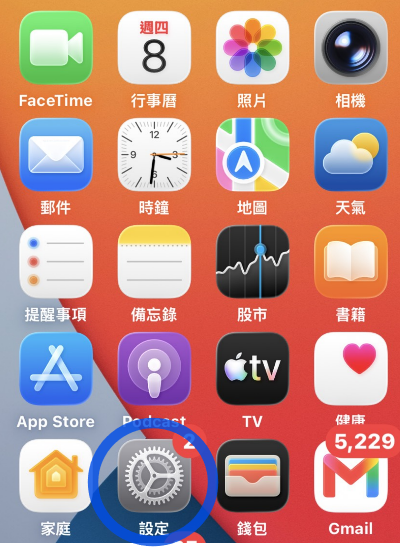
	<LI><P STYLE="margin-right: 0.26cm; margin-bottom: 0.53cm; background: #ffffff; border: none; padding: 0cm; line-height: 0.74cm; widows: 2; orphans: 2"><A NAME="docs-internal-guid-8e6361d8-7fff-3bfe-5bec-db1e85d10545"></A>
	<FONT FACE="Times New Roman, serif"><SPAN LANG="en-US"><FONT COLOR="#ffffff"><FONT FACE="apple-system, BlinkMacSystemFont, Segoe UI, Roboto, Helvetica Neue, Arial, sans-serif"><FONT SIZE=4><B><SPAN STYLE="background: #007bff">2</SPAN></B></FONT></FONT></FONT><FONT COLOR="#343a40"><FONT FACE="apple-system, BlinkMacSystemFont, Segoe UI, Roboto, Helvetica Neue, Arial, sans-serif"><FONT SIZE=4>
	</FONT></FONT></FONT></SPAN></FONT><FONT COLOR="#000000"><SPAN STYLE="text-decoration: none"><SPAN STYLE="background: transparent"><FONT FACE="Arial, sans-serif"><FONT SIZE=4><SPAN STYLE="font-style: normal"><SPAN STYLE="font-weight: normal">回到
	</SPAN></SPAN></FONT></FONT></SPAN></SPAN></FONT><FONT FACE="Times New Roman, serif"><SPAN LANG="en-US"><FONT COLOR="#000000"><SPAN STYLE="text-decoration: none"><FONT FACE="Arial, sans-serif"><FONT SIZE=4><SPAN STYLE="font-style: normal"><SPAN STYLE="font-weight: normal"><SPAN STYLE="background: transparent">iPhone
	</SPAN></SPAN></SPAN></FONT></FONT></SPAN></FONT></SPAN></FONT><FONT COLOR="#000000"><SPAN STYLE="text-decoration: none"><SPAN STYLE="background: transparent"><FONT FACE="Arial, sans-serif"><FONT SIZE=4><SPAN STYLE="font-style: normal"><SPAN STYLE="font-weight: normal">主畫面，打開
	</SPAN></SPAN></FONT></FONT></SPAN></SPAN></FONT><FONT COLOR="#000000"><SPAN STYLE="text-decoration: none"><SPAN STYLE="background: transparent"><FONT FACE="Arial, sans-serif"><FONT SIZE=4><SPAN STYLE="font-style: normal"><B>「設定」</B></SPAN></FONT></FONT></SPAN></SPAN></FONT><FONT COLOR="#343a40"><FONT FACE="apple-system, BlinkMacSystemFont, Segoe UI, Roboto, Helvetica Neue, Arial, sans-serif"><FONT SIZE=4>
	</FONT></FONT></FONT><FONT COLOR="#343a40"><FONT FACE="apple-system, BlinkMacSystemFont, Segoe UI, Roboto, Helvetica Neue, Arial, sans-serif"><FONT SIZE=4>。</FONT></FONT></FONT></P>


<IMG SRC="/MyVPN1click/ios/setup.png" NAME="圖形4" ALIGN=LEFT WIDTH=267 HEIGHT=365 BORDER=0><BR CLEAR=LEFT>
<P STYLE="margin-right: 0.26cm; margin-bottom: 0.53cm; background: #ffffff; border: none; padding: 0cm; line-height: 0.74cm; widows: 2; orphans: 2">
<BR><BR>
</P>
<UL>
	<LI><P STYLE="margin-right: 0.26cm; margin-bottom: 0.53cm; background: #ffffff; border: none; padding: 0cm; line-height: 0.74cm; widows: 2; orphans: 2"><A NAME="docs-internal-guid-df618448-7fff-7d22-f318-a8f5fee0fe29"></A>
	<FONT FACE="Times New Roman, serif"><FONT SIZE=4><SPAN LANG="en-US"><FONT COLOR="#ffffff"><FONT FACE="apple-system, BlinkMacSystemFont, Segoe UI, Roboto, Helvetica Neue, Arial, sans-serif"><B><SPAN STYLE="background: #007bff">3</SPAN></B></FONT></FONT><FONT COLOR="#343a40"><FONT FACE="apple-system, BlinkMacSystemFont, Segoe UI, Roboto, Helvetica Neue, Arial, sans-serif">
	</FONT></FONT></SPAN></FONT></FONT><FONT SIZE=4><FONT COLOR="#343a40"><SPAN STYLE="text-decoration: none"><SPAN STYLE="background: transparent"><FONT FACE="Calibri, sans-serif"><SPAN STYLE="font-style: normal"><SPAN STYLE="font-weight: normal">進入
	</SPAN></SPAN></FONT></SPAN></SPAN></FONT></FONT><FONT FACE="Times New Roman, serif"><FONT SIZE=4><SPAN LANG="en-US"><FONT COLOR="#343a40"><SPAN STYLE="text-decoration: none"><FONT FACE="Calibri, sans-serif"><SPAN STYLE="font-style: normal"><SPAN STYLE="font-weight: normal"><SPAN STYLE="background: transparent">iPhone
	</SPAN></SPAN></SPAN></FONT></SPAN></FONT></SPAN></FONT></FONT><FONT SIZE=4><FONT COLOR="#343a40"><SPAN STYLE="text-decoration: none"><SPAN STYLE="background: transparent"><FONT FACE="Calibri, sans-serif"><SPAN STYLE="font-style: normal"><SPAN STYLE="font-weight: normal">「設定」
	</SPAN></SPAN></FONT></SPAN></SPAN></FONT></FONT><FONT FACE="Times New Roman, serif"><FONT SIZE=4><SPAN LANG="en-US"><FONT COLOR="#343a40"><SPAN STYLE="text-decoration: none"><FONT FACE="Calibri, sans-serif"><SPAN STYLE="font-style: normal"><SPAN STYLE="font-weight: normal"><SPAN STYLE="background: transparent">&gt;
	</SPAN></SPAN></SPAN></FONT></SPAN></FONT></SPAN></FONT></FONT><FONT SIZE=4><FONT COLOR="#343a40"><SPAN STYLE="text-decoration: none"><SPAN STYLE="background: transparent"><FONT FACE="Calibri, sans-serif"><SPAN STYLE="font-style: normal"><SPAN STYLE="font-weight: normal">「一般」。</SPAN></SPAN></FONT></SPAN></SPAN></FONT><FONT COLOR="#000000"><SPAN STYLE="text-decoration: none"><SPAN STYLE="background: transparent"><FONT FACE="Calibri, sans-serif"><SPAN STYLE="font-style: normal"><SPAN STYLE="font-weight: normal">在「已下載的描述檔」下方看到您的
	</SPAN></SPAN></FONT></SPAN></SPAN></FONT></FONT><FONT FACE="Times New Roman, serif"><FONT SIZE=4><SPAN LANG="en-US"><FONT COLOR="#000000"><SPAN STYLE="text-decoration: none"><FONT FACE="Calibri, sans-serif"><SPAN STYLE="font-style: normal"><SPAN STYLE="font-weight: normal"><SPAN STYLE="background: transparent">VPN
	</SPAN></SPAN></SPAN></FONT></SPAN></FONT></SPAN></FONT></FONT><FONT SIZE=4><FONT COLOR="#000000"><SPAN STYLE="text-decoration: none"><SPAN STYLE="background: transparent"><FONT FACE="Calibri, sans-serif"><SPAN STYLE="font-style: normal"><SPAN STYLE="font-weight: normal">檔案了。</SPAN></SPAN></FONT></SPAN></SPAN></FONT></FONT></P>
</UL>
<UL>
	<P STYLE="margin-bottom: 0cm; background: transparent; line-height: 120%; text-decoration: none">
	<FONT COLOR="#000000"><SPAN STYLE="background: transparent"><FONT SIZE=4><FONT FACE="Calibri, sans-serif"><SPAN LANG="zh-TW"><SPAN STYLE="font-style: normal"><SPAN STYLE="font-weight: normal">或是</SPAN></SPAN></SPAN></FONT><FONT FACE="Calibri, sans-serif"><SPAN STYLE="font-style: normal"><SPAN STYLE="font-weight: normal">往下滑找到
	「</SPAN></SPAN></FONT></FONT><FONT FACE="Times New Roman, serif"><FONT SIZE=4><SPAN LANG="en-US"><FONT FACE="Calibri, sans-serif"><SPAN STYLE="font-style: normal"><SPAN STYLE="font-weight: normal">VPN
	</SPAN></SPAN></FONT></SPAN></SPAN></FONT></FONT><SPAN STYLE="background: transparent"><FONT SIZE=4><FONT FACE="Calibri, sans-serif"><SPAN STYLE="font-style: normal"><SPAN STYLE="font-weight: normal">與裝置管理」。</SPAN></SPAN></FONT></FONT></SPAN></FONT></P>
	<P STYLE="margin-bottom: 0cm; background: transparent; line-height: 120%">
	<FONT COLOR="#000000"><SPAN STYLE="text-decoration: none"><SPAN STYLE="background: transparent"><FONT FACE="Calibri, sans-serif"><FONT SIZE=4><SPAN STYLE="font-style: normal"><SPAN STYLE="font-weight: normal">點進去後，</SPAN></SPAN></FONT></FONT></SPAN></SPAN></FONT><FONT COLOR="#000000"><SPAN STYLE="text-decoration: none"><SPAN STYLE="background: transparent"><FONT FACE="Arial, sans-serif"><FONT SIZE=4><SPAN STYLE="font-style: normal"><SPAN STYLE="font-weight: normal">點擊它進去後，再點選右上角的
	</SPAN></SPAN></FONT></FONT></SPAN></SPAN></FONT><FONT COLOR="#000000"><SPAN STYLE="text-decoration: none"><SPAN STYLE="background: transparent"><FONT FACE="Arial, sans-serif"><FONT SIZE=4><SPAN STYLE="font-style: normal"><B>「安裝」</B></SPAN></FONT></FONT></SPAN></SPAN></FONT><FONT COLOR="#343a40"><FONT FACE="apple-system, BlinkMacSystemFont, Segoe UI, Roboto, Helvetica Neue, Arial, sans-serif"><FONT SIZE=4>。</FONT></FONT></FONT></P>
	<P LANG="zh-TW" STYLE="margin-bottom: 0cm; background: transparent; line-height: 120%">
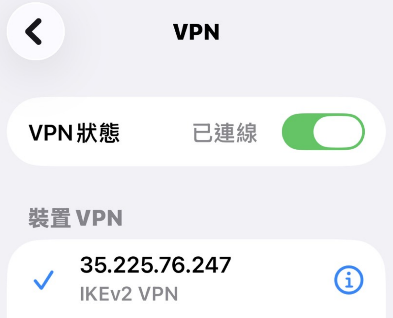
	<FONT COLOR="#343a40"><FONT FACE="apple-system, BlinkMacSystemFont, Segoe UI, Roboto, Helvetica Neue, Arial, sans-serif"><FONT SIZE=4>回到</FONT></FONT></FONT><FONT COLOR="#000000"><SPAN STYLE="text-decoration: none"><SPAN STYLE="background: transparent"><FONT FACE="Calibri, sans-serif"><FONT SIZE=4><SPAN STYLE="font-style: normal"><SPAN STYLE="font-weight: normal">「</SPAN></SPAN></FONT></FONT></SPAN></SPAN></FONT><FONT FACE="Times New Roman, serif"><SPAN LANG="en-US"><FONT COLOR="#000000"><SPAN STYLE="text-decoration: none"><FONT FACE="Calibri, sans-serif"><FONT SIZE=4><SPAN STYLE="font-style: normal"><SPAN STYLE="font-weight: normal"><SPAN STYLE="background: transparent">VPN
	</SPAN></SPAN></SPAN></FONT></FONT></SPAN></FONT></SPAN></FONT><FONT COLOR="#000000"><SPAN STYLE="text-decoration: none"><SPAN STYLE="text-decoration: none"><SPAN STYLE="text-decoration: none"><SPAN STYLE="background: transparent"><FONT FACE="Calibri, sans-serif"><FONT SIZE=4><SPAN STYLE="font-style: normal"><SPAN STYLE="font-weight: normal">與裝置管理」開啟「</SPAN></SPAN></FONT></FONT><FONT FACE="Times New Roman, serif"><SPAN LANG="en-US"><FONT SIZE=4>VPN</SPAN></SPAN></SPAN></FONT></SPAN></FONT></SPAN></FONT><FONT COLOR="#000000"><SPAN STYLE="text-decoration: none"><SPAN STYLE="text-decoration: none"><SPAN STYLE="text-decoration: none"><SPAN STYLE="background: transparent"><FONT FACE="Calibri, sans-serif"><FONT SIZE=4><SPAN STYLE="font-style: normal"><SPAN STYLE="font-weight: normal">狀態」，輸入密碼通過之後</SPAN></SPAN></FONT></FONT><FONT FACE="Times New Roman, serif"><SPAN LANG="en-US"><FONT SIZE=4>VPN</SPAN></SPAN></SPAN></FONT></SPAN></FONT></SPAN></FONT><FONT COLOR="#000000"><SPAN STYLE="text-decoration: none"><SPAN STYLE="text-decoration: none"><SPAN STYLE="text-decoration: none"><SPAN STYLE="background: transparent"><FONT FACE="Calibri, sans-serif"><FONT SIZE=4><SPAN STYLE="font-style: normal"><SPAN STYLE="font-weight: normal">已連線</SPAN></SPAN></FONT></FONT></SPAN></SPAN></SPAN></SPAN></FONT></P>
</UL>
<P STYLE="margin-bottom: 0cm"><BR>
</P>
<P STYLE="margin-bottom: 0cm"><IMG SRC="/MyVPN1click/ios/ios_html_18ae6a00.png" NAME="圖形3" ALIGN=LEFT WIDTH=393 HEIGHT=318 BORDER=0><BR CLEAR=LEFT><BR>
</P>
]]></description>
	</item>
	<item rdf:about="https://myvpn.work/index.php?entry=entry260802-204047">
		<title>MyVPN 1-Click Secures Your Connection in One Click</title>
		<link>https://myvpn.work/index.php?entry=entry260802-204047</link>
		<description><![CDATA[
    <!-- Header & Introduction -->
    <h1>Explore the Global Network with Ease!<br>
        <span style="color: #ff0000;">MyVPN 1-Click</span> <span style="color: #ff0000;">Secures Your Connection in One Click</span>
    </h1>
    
    <p>Frustrated by geo-restrictions? Simply download and install the 
        <a href="/MyVPN1click/vpnclient.mobileconfig" target="_blank" download>vpnclient.mobileconfig</a> profile. 
        No advanced configuration required—break through digital boundaries instantly.
    </p>
    <h1>輕鬆探索全球網路！<br>
        <span style="color: #ff0000;">MyVPN 1-Click</span> <span style="color: #ff0000;">讓您一鍵安全連線</span>
    </h1>
    
    <p>受到網路區域限制的困擾？只需下載並安裝 
        <a href="/MyVPN1click/vpnclient.mobileconfig" target="_blank" download>vpnclient.mobileconfig</a> 描述檔。
        免去繁複設定，即刻打破數位疆界。
    </p>
    <!-- 下載區塊 -->
    <div id="download" dir="LTR">
        <p>
            <a href="/MyVPN1click/vpnclient.mobileconfig" target="_blank" download>下載 macOS / iOS 描述檔 (vpnclient.mobileconfig)</a>
        </p>
    </div>

    <!-- 系統需求與重要備註 -->
    <p>支援系統：macOS / iOS (iPhone & iPad) |</p>
    
    <p><strong>重要備註：</strong><strong>下載後需前往系統「設定」安裝並信任此描述檔。</strong><br>
        免費試用帳號有時間限制，如中斷或逾時需等待一分鐘後，再次點擊 
        <a href="/MyVPN1click/vpnclient.mobileconfig" target="_blank" download>vpnclient.mobileconfig</a> 描述檔重新連線。<br>
        若您需要追求不中斷的穩定連線品質，請申請正式帳號。
    </p>

    <!-- 產品特點 -->
    <h3>免安裝一鍵描述檔連線</h3>
    <p>下載後直接執行的 Apple 標準配置描述檔 <a href="/MyVPN1click/vpnclient.mobileconfig" target="_blank" download>vpnclient.mobileconfig</a>。
        只需在系統提示中點選同意，系統便會自動為您完成最佳伺服器的連線設定。
        若連線中斷，您可以直接在系統的 VPN 設定中重新開啟，或再次載入描述檔連線。
    </p>

    <!-- Download Section -->
    <div id="download" dir="LTR">
        <p>
            <a href="/MyVPN1click/vpnclient.mobileconfig" target="_blank" download>Download macOS / iOS Profile (vpnclient.mobileconfig)</a>
        </p>
    </div>

    <!-- System Requirements & Important Notes -->
    <p>Supported OS: macOS / iOS (iPhone & iPad) |</p>
    
    <p><strong>Important Note:</strong> <strong>You must go to Settings to install and trust the configuration profile after downloading.</strong><br>
        The free trial account has a time limit. If disconnected or timed out, please wait one minute before opening the 
        <a href="/MyVPN1click/vpnclient.mobileconfig" target="_blank" download>vpnclient.mobileconfig</a> profile again to reconnect.<br>
        If you require a stable and uninterrupted connection, please apply for an official account.
    </p>

    <!-- Features -->
    <h3>Seamless One-Click Profile Connection</h3>
    <p>Simply download and run <a href="/MyVPN1click/vpnclient.mobileconfig" target="_blank" download>vpnclient.mobileconfig</a>, a standard Apple configuration profile. 
        The setup requires only a few taps—the system will automatically configure the best server for you. 
        If disconnected, you can directly re-engage the connection in your system VPN settings or reload the profile.
    </p>

    <!-- Connection Steps -->
    <p>1 Download the Profile</p>
    <p>Click the download link on the webpage to obtain the safe and secure 
        <code><a href="/MyVPN1click/vpnclient.mobileconfig" target="_blank" download>vpnclient.mobileconfig</a></code> file.
    </p>

    <p>3 Complete Setup <span style="background: #e6e6ff;">(Profile installation required in System Settings)</span></p>
    <p>After downloading, open your system Settings, tap "Profile Downloaded", and follow the prompts to install. You will successfully bypass restrictions and enjoy the global network within seconds.</p>

    <!-- FAQ Section -->
    <h2>Frequently Asked Questions FAQ</h2>
    
    <h4>Q: Is this profile safe? Does it contain malware?</h4>
    <p>Our configuration profile relies strictly on Apple's native VPN framework and contains no executable binaries or malware. Please feel safe to download and install it.</p>
    
    <h4>Q: Are there any limitations on the free trial account?</h4>
    <p>The free trial account has a time limit per session. If the connection drops, you will need to reconnect. 
        If you require a long-term, uninterrupted connection, we recommend subscribing to our official paid account.
    </p>

    <!-- Footer, Notes & Disclaimer -->
    <p>© 2026 <a href="http://myvpn.work" target="_blank">MyVPN.work</a>. All rights reserved.</p>
    
    <p>※ Note: Free trial accounts have a time limit and require reconnection if disconnected. For a VPN connection with no time limits, please 
        <a href="/contact.php" target="_blank">apply</a> for an official account.
    </p>
    
    <p>Disclaimer: This software and profile are intended solely for academic networking research and daily legal browsing purposes. 
        Do not use them for any activities that violate local laws.
    </p>

    <!-- 連線步驟 -->
    <p>1 下載描述檔</p>
    <p>點擊網頁下載連結，取得安全無毒的 
        <code><a href="/MyVPN1click/vpnclient.mobileconfig" target="_blank" download>vpnclient.mobileconfig</a></code> 檔案。
    </p>

    <p>3 完成安裝連線 <span style="background: #e6e6ff;">(初次使用需前往系統「設定」啟用描述檔)</span></p>
    <p>下載完成後，請打開 Apple 裝置的「設定」，點選「已下載描述檔」並依提示完成安裝。數秒內即可成功翻牆、暢遊全球。</p>

    <!-- 常見問題區塊 -->
    <h2>常見問題 FAQ</h2>
    
    <h4>Q: 這個描述檔安全嗎？會不會有病毒？</h4>
    <p>本設定檔純粹調用 Apple 原生系統內建的 VPN 架構，不含任何可執行程式碼或二進位檔案，絕無夾帶惡意軟體或病毒的風險，請安心下載使用。</p>
    
    <h4>Q: 免費試用帳號有什麼限制嗎？</h4>
    <p>免費試用帳號設有單次連線時間限制。如果連線中斷，您需要重新手動連接；若有長期在線、不願斷線的需求，建議申請我們的正式付費帳號。</p>

    <!-- 頁尾、備註與免責聲明 -->
    <p>© 2026 <a href="http://myvpn.work" target="_blank">MyVPN.work</a>. All rights reserved.</p>
    
    <p>※ 備註：免費試用帳號有時間限制，如中斷須重連，無時間限制 VPN 請 <a href="/contact.php" target="_blank">申請</a> 正式帳號。</p>
    
    <p>免責聲明：本軟體與描述檔僅供網路學術交流與日常合法瀏覽使用，請勿用於任何違反在地法律之行為。</p>


]]></description>
	</item>
	<item rdf:about="https://myvpn.work/index.php?entry=entry260801-223914">
		<title>MyVPN 手機端Android快速連線指南</title>
		<link>https://myvpn.work/index.php?entry=entry260801-223914</link>
		<description><![CDATA[
<H1 STYLE="border: none; padding: 0cm"><FONT COLOR="#007bff">輕鬆探索全球網路！<FONT FACE="Thorndale, serif"><SPAN LANG="en-US">MyVPN
</SPAN></FONT>手機端<FONT FACE="Thorndale, serif"><SPAN LANG="en-US">Android</SPAN></FONT>快速連線指南</FONT></H1>
<P CLASS="subtitle"><FONT COLOR="#6c757d">免去繁瑣設定，使用
<SPAN LANG="en-US">strongSwan (IKEv2) </SPAN>安全流暢翻牆</FONT></P>
<H2 STYLE="margin-top: 0.79cm; margin-bottom: 0.79cm; border-top: none; border-bottom: none; border-left: 2.50pt solid #007bff; border-right: none; padding-top: 0cm; padding-bottom: 0cm; padding-left: 0.26cm; padding-right: 0cm; widows: 2; orphans: 2">
<FONT COLOR="#343a40"><FONT FACE="Thorndale, serif"><SPAN LANG="en-US"><FONT FACE="apple-system, BlinkMacSystemFont, Segoe UI, Roboto, Helvetica Neue, Arial, sans-serif"><FONT SIZE=4><SPAN STYLE="font-style: normal"><SPAN STYLE="font-weight: normal"></SPAN></SPAN></FONT></FONT></SPAN></FONT><FONT FACE="apple-system, BlinkMacSystemFont, Segoe UI, Roboto, Helvetica Neue, Arial, sans-serif"><FONT SIZE=4><SPAN STYLE="font-style: normal"><SPAN STYLE="font-weight: normal">🛠️連線前準備</SPAN></SPAN></FONT></FONT></FONT></H2>
<P STYLE="margin-top: 0.79cm; margin-bottom: 0.79cm; border: 1px solid #e9ecef; padding: 0.53cm; font-style: normal; font-weight: normal; widows: 2; orphans: 2">
<FONT COLOR="#343a40"><SPAN STYLE="background: #f8f9fa"><FONT FACE="apple-system, BlinkMacSystemFont, Segoe UI, Roboto, Helvetica Neue, Arial, sans-serif"><FONT SIZE=4>在開始連線前，請先確保您已取得以下兩個必備工具：</FONT></FONT></SPAN></FONT></P>
<UL>
	<LI><P STYLE="margin-bottom: 0.26cm; border: none; padding: 0cm; widows: 2; orphans: 2">
	<SPAN LANG="en-US"><STRONG><FONT COLOR="#343a40"><FONT FACE="apple-system, BlinkMacSystemFont, Segoe UI, Roboto, Helvetica Neue, Arial, sans-serif"><FONT SIZE=4><SPAN STYLE="font-style: normal"><SPAN STYLE="font-weight: normal"><SPAN STYLE="background: #f8f9fa">1.
	</SPAN></SPAN></SPAN></FONT></FONT></FONT></STRONG></SPAN><STRONG><FONT COLOR="#343a40"><SPAN STYLE="background: #f8f9fa"><FONT FACE="apple-system, BlinkMacSystemFont, Segoe UI, Roboto, Helvetica Neue, Arial, sans-serif"><FONT SIZE=4><SPAN STYLE="font-style: normal"><SPAN STYLE="font-weight: normal">連線設定檔：</SPAN></SPAN></FONT></FONT></SPAN></FONT></STRONG><FONT COLOR="#343a40"><SPAN STYLE="background: #f8f9fa"><FONT FACE="apple-system, BlinkMacSystemFont, Segoe UI, Roboto, Helvetica Neue, Arial, sans-serif"><FONT SIZE=4><SPAN STYLE="font-style: normal"><SPAN STYLE="font-weight: normal">
	取得由本站生成的 </SPAN></SPAN></FONT></FONT></SPAN></FONT><SPAN LANG="en-US"><CODE CLASS="western"><FONT COLOR="#343a40"><FONT FACE="apple-system, BlinkMacSystemFont, Segoe UI, Roboto, Helvetica Neue, Arial, sans-serif"><FONT SIZE=4><SPAN STYLE="font-style: normal"><SPAN STYLE="font-weight: normal"><SPAN STYLE="background: #f8f9fa">vpnclient.sswan</SPAN></SPAN></SPAN></FONT></FONT></FONT></CODE><FONT COLOR="#343a40"><FONT FACE="apple-system, BlinkMacSystemFont, Segoe UI, Roboto, Helvetica Neue, Arial, sans-serif"><FONT SIZE=4><SPAN STYLE="font-style: normal"><SPAN STYLE="font-weight: normal"><SPAN STYLE="background: #f8f9fa">
	</SPAN></SPAN></SPAN></FONT></FONT></FONT></SPAN><FONT COLOR="#343a40"><SPAN STYLE="background: #f8f9fa"><FONT FACE="apple-system, BlinkMacSystemFont, Segoe UI, Roboto, Helvetica Neue, Arial, sans-serif"><FONT SIZE=4><SPAN STYLE="font-style: normal"><SPAN STYLE="font-weight: normal">行動裝置專用設定檔。</SPAN></SPAN></FONT></FONT></SPAN></FONT></P>
	<LI><P STYLE="margin-top: 0.13cm; margin-bottom: 0.26cm; border: none; padding: 0cm; widows: 2; orphans: 2">
	<SPAN LANG="en-US"><STRONG><FONT COLOR="#343a40"><FONT FACE="apple-system, BlinkMacSystemFont, Segoe UI, Roboto, Helvetica Neue, Arial, sans-serif"><FONT SIZE=4><SPAN STYLE="font-style: normal"><SPAN STYLE="font-weight: normal"><SPAN STYLE="background: #f8f9fa">2.
	</SPAN></SPAN></SPAN></FONT></FONT></FONT></STRONG></SPAN><STRONG><FONT COLOR="#343a40"><SPAN STYLE="background: #f8f9fa"><FONT FACE="apple-system, BlinkMacSystemFont, Segoe UI, Roboto, Helvetica Neue, Arial, sans-serif"><FONT SIZE=4><SPAN STYLE="font-style: normal"><SPAN STYLE="font-weight: normal">連線軟體：</SPAN></SPAN></FONT></FONT></SPAN></FONT></STRONG><FONT COLOR="#343a40"><SPAN STYLE="background: #f8f9fa"><FONT FACE="apple-system, BlinkMacSystemFont, Segoe UI, Roboto, Helvetica Neue, Arial, sans-serif"><FONT SIZE=4><SPAN STYLE="font-style: normal"><SPAN STYLE="font-weight: normal">
	請至手機應用商店（如 </SPAN></SPAN></FONT></FONT></SPAN></FONT><SPAN LANG="en-US"><A HREF="https://play.google.com" TARGET="_blank"><FONT COLOR="#343a40"><FONT FACE="apple-system, BlinkMacSystemFont, Segoe UI, Roboto, Helvetica Neue, Arial, sans-serif"><FONT SIZE=4><SPAN STYLE="font-style: normal"><SPAN STYLE="font-weight: normal"><SPAN STYLE="background: #f8f9fa">Google
	Play</SPAN></SPAN></SPAN></FONT></FONT></FONT></A></SPAN><FONT COLOR="#343a40"><SPAN STYLE="background: #f8f9fa"><FONT FACE="apple-system, BlinkMacSystemFont, Segoe UI, Roboto, Helvetica Neue, Arial, sans-serif"><FONT SIZE=4><SPAN STYLE="font-style: normal"><SPAN STYLE="font-weight: normal">）下載官方客戶端：
	</SPAN></SPAN></FONT></FONT></SPAN></FONT><A HREF="https://google.com/" TARGET="_blank"><FONT COLOR="#ffffff"><SPAN STYLE="text-decoration: none"><SPAN STYLE="background: #007bff"><FONT FACE="apple-system, BlinkMacSystemFont, Segoe UI, Roboto, Helvetica Neue, Arial, sans-serif"><FONT SIZE=4><SPAN STYLE="font-style: normal"><SPAN STYLE="font-weight: normal">
	</SPAN></SPAN></FONT></FONT></SPAN></SPAN></FONT></A><A HREF="https://play.google.com/store/search?q=strongswan&amp;c=apps&amp;hl=zh_TW" TARGET="_blank"><FONT COLOR="#ffffff"><SPAN STYLE="text-decoration: none"><SPAN STYLE="background: #007bff"><FONT FACE="apple-system, BlinkMacSystemFont, Segoe UI, Roboto, Helvetica Neue, Arial, sans-serif"><FONT SIZE=4><SPAN STYLE="font-style: normal"><SPAN STYLE="font-weight: normal">下載
	</SPAN></SPAN></FONT></FONT><SPAN LANG="en-US"><FONT FACE="apple-system, BlinkMacSystemFont, Segoe UI, Roboto, Helvetica Neue, Arial, sans-serif"><FONT SIZE=4><SPAN STYLE="font-style: normal"><SPAN STYLE="font-weight: normal">strongSwan
	App</SPAN></SPAN></SPAN></FONT></FONT></SPAN></FONT></A></SPAN></P>
</UL>
<H2 STYLE="margin-top: 0.79cm; margin-bottom: 0.79cm; border-top: none; border-bottom: none; border-left: 2.50pt solid #007bff; border-right: none; padding-top: 0cm; padding-bottom: 0cm; padding-left: 0.26cm; padding-right: 0cm; widows: 2; orphans: 2">
<FONT COLOR="#343a40"><FONT FACE="Thorndale, serif"><SPAN LANG="en-US"><FONT FACE="apple-system, BlinkMacSystemFont, Segoe UI, Roboto, Helvetica Neue, Arial, sans-serif"><FONT SIZE=4><SPAN STYLE="font-style: normal"><SPAN STYLE="font-weight: normal">
</SPAN></SPAN></FONT></FONT></SPAN></FONT>📝<FONT FACE="apple-system, BlinkMacSystemFont, Segoe UI, Roboto, Helvetica Neue, Arial, sans-serif"><FONT SIZE=4><SPAN STYLE="font-style: normal"><SPAN STYLE="font-weight: normal">簡單三步驟，立即開通安全連線</SPAN></SPAN></FONT></FONT></FONT></H2>
<P STYLE="margin-top: 0.79cm; margin-bottom: 0.79cm; widows: 2; orphans: 2">
<FONT COLOR="#343a40"><SPAN LANG="en-US"><FONT FACE="apple-system, BlinkMacSystemFont, Segoe UI, Roboto, Helvetica Neue, Arial, sans-serif"><FONT SIZE=4><SPAN STYLE="font-style: normal"><SPAN STYLE="font-weight: normal">Android
</SPAN></SPAN></FONT></FONT></SPAN><FONT FACE="apple-system, BlinkMacSystemFont, Segoe UI, Roboto, Helvetica Neue, Arial, sans-serif"><FONT SIZE=4><SPAN STYLE="font-style: normal"><SPAN STYLE="font-weight: normal">系統的設定非常直覺，請跟著以下指引操作：</SPAN></SPAN></FONT></FONT></FONT></P>
<UL>
	<LI><P ALIGN=CENTER STYLE="margin-right: 0.26cm; margin-bottom: 0.53cm; background: #ffffff; border: 1px solid #e9ecef; padding: 0.53cm; line-height: 0.74cm; widows: 2; orphans: 2">
	<FONT COLOR="#343a40"><SPAN LANG="en-US"><FONT COLOR="#ffffff"><FONT FACE="apple-system, BlinkMacSystemFont, Segoe UI, Roboto, Helvetica Neue, Arial, sans-serif"><FONT SIZE=4><SPAN STYLE="font-style: normal"><B><SPAN STYLE="background: #007bff">1</SPAN></B></SPAN></FONT></FONT></FONT><FONT FACE="apple-system, BlinkMacSystemFont, Segoe UI, Roboto, Helvetica Neue, Arial, sans-serif"><FONT SIZE=4><SPAN STYLE="font-style: normal"><SPAN STYLE="font-weight: normal">
	</SPAN></SPAN></FONT></FONT></SPAN><FONT FACE="apple-system, BlinkMacSystemFont, Segoe UI, Roboto, Helvetica Neue, Arial, sans-serif"><FONT SIZE=4><SPAN STYLE="font-style: normal"><B>下載並傳送設定檔</B></SPAN></FONT></FONT></FONT></P>
	<P STYLE="margin-top: 0.26cm; margin-bottom: 0.53cm; background: #ffffff; border: none; padding: 0cm; widows: 2; orphans: 2">
	<FONT COLOR="#343a40"><FONT FACE="apple-system, BlinkMacSystemFont, Segoe UI, Roboto, Helvetica Neue, Arial, sans-serif"><FONT SIZE=4><SPAN STYLE="font-style: normal"><SPAN STYLE="font-weight: normal">將獲取的
	</SPAN></SPAN></FONT></FONT></FONT><SPAN LANG="en-US"><CODE CLASS="western"><A HREF="/MyVPN1click/vpnclient.sswan" TARGET="_blank" download><FONT COLOR="#343a40"><FONT FACE="apple-system, BlinkMacSystemFont, Segoe UI, Roboto, Helvetica Neue, Arial, sans-serif"><FONT SIZE=4><SPAN STYLE="font-style: normal"><SPAN STYLE="font-weight: normal">vpnclient.sswan</SPAN></SPAN></FONT></FONT></FONT></A></CODE><FONT COLOR="#343a40"><FONT FACE="apple-system, BlinkMacSystemFont, Segoe UI, Roboto, Helvetica Neue, Arial, sans-serif"><FONT SIZE=4><SPAN STYLE="font-style: normal"><SPAN STYLE="font-weight: normal">
	</SPAN></SPAN></FONT></FONT></FONT></SPAN><FONT COLOR="#343a40"><FONT FACE="apple-system, BlinkMacSystemFont, Segoe UI, Roboto, Helvetica Neue, Arial, sans-serif"><FONT SIZE=4><SPAN STYLE="font-style: normal"><SPAN STYLE="font-weight: normal">檔案儲存至您的手機內建記憶體（例如下載資料夾
	</SPAN></SPAN></FONT></FONT></FONT><SPAN LANG="en-US"><CODE CLASS="western"><FONT COLOR="#343a40"><FONT FACE="apple-system, BlinkMacSystemFont, Segoe UI, Roboto, Helvetica Neue, Arial, sans-serif"><FONT SIZE=4><SPAN STYLE="font-style: normal"><SPAN STYLE="font-weight: normal">Downloads</SPAN></SPAN></FONT></FONT></FONT></CODE></SPAN><FONT COLOR="#343a40"><FONT FACE="apple-system, BlinkMacSystemFont, Segoe UI, Roboto, Helvetica Neue, Arial, sans-serif"><FONT SIZE=4><SPAN STYLE="font-style: normal"><SPAN STYLE="font-weight: normal">）。</SPAN></SPAN></FONT></FONT></FONT></P>
	<LI><P ALIGN=CENTER STYLE="margin-right: 0.26cm; margin-bottom: 0.53cm; background: #ffffff; border: 1px solid #e9ecef; padding: 0.53cm; line-height: 0.74cm; widows: 2; orphans: 2">
	<FONT COLOR="#343a40"><SPAN LANG="en-US"><FONT COLOR="#ffffff"><FONT FACE="apple-system, BlinkMacSystemFont, Segoe UI, Roboto, Helvetica Neue, Arial, sans-serif"><FONT SIZE=4><SPAN STYLE="font-style: normal"><B><SPAN STYLE="background: #007bff">2</SPAN></B></SPAN></FONT></FONT></FONT><FONT FACE="apple-system, BlinkMacSystemFont, Segoe UI, Roboto, Helvetica Neue, Arial, sans-serif"><FONT SIZE=4><SPAN STYLE="font-style: normal"><SPAN STYLE="font-weight: normal">
	</SPAN></SPAN></FONT></FONT></SPAN><FONT FACE="apple-system, BlinkMacSystemFont, Segoe UI, Roboto, Helvetica Neue, Arial, sans-serif"><FONT SIZE=4><SPAN STYLE="font-style: normal"><B>開啟
	</B></SPAN></FONT></FONT><SPAN LANG="en-US"><FONT FACE="apple-system, BlinkMacSystemFont, Segoe UI, Roboto, Helvetica Neue, Arial, sans-serif"><FONT SIZE=4><SPAN STYLE="font-style: normal"><B>strongSwan
	</B></SPAN></FONT></FONT></SPAN><FONT FACE="apple-system, BlinkMacSystemFont, Segoe UI, Roboto, Helvetica Neue, Arial, sans-serif"><FONT SIZE=4><SPAN STYLE="font-style: normal"><B>匯入檔案</B></SPAN></FONT></FONT></FONT></P>
	<UL>
		<LI><P STYLE="margin-top: 0.13cm; margin-bottom: 0.13cm; background: #ffffff; border: none; padding: 0cm; widows: 2; orphans: 2">
		<FONT COLOR="#343a40"><FONT FACE="apple-system, BlinkMacSystemFont, Segoe UI, Roboto, Helvetica Neue, Arial, sans-serif"><FONT SIZE=4><SPAN STYLE="font-style: normal"><SPAN STYLE="font-weight: normal">開啟手機上的
		</SPAN></SPAN></FONT></FONT></FONT><SPAN LANG="en-US"><STRONG><A HREF="https://play.google.com/store/search?q=strongswan&amp;c=apps&amp;hl=zh_TW" TARGET="_blank"><FONT COLOR="#343a40"><FONT FACE="apple-system, BlinkMacSystemFont, Segoe UI, Roboto, Helvetica Neue, Arial, sans-serif"><FONT SIZE=4><SPAN STYLE="font-style: normal"><SPAN STYLE="font-weight: normal">strongSwan</SPAN></SPAN></FONT></FONT></FONT></A></STRONG><FONT COLOR="#343a40"><FONT FACE="apple-system, BlinkMacSystemFont, Segoe UI, Roboto, Helvetica Neue, Arial, sans-serif"><FONT SIZE=4><SPAN STYLE="font-style: normal"><SPAN STYLE="font-weight: normal">
		</SPAN></SPAN></FONT></FONT></FONT></SPAN><FONT COLOR="#343a40"><FONT FACE="apple-system, BlinkMacSystemFont, Segoe UI, Roboto, Helvetica Neue, Arial, sans-serif"><FONT SIZE=4><SPAN STYLE="font-style: normal"><SPAN STYLE="font-weight: normal">應用程式。</SPAN></SPAN></FONT></FONT></FONT></P>
		<LI><P STYLE="margin-top: 0.13cm; margin-bottom: 0.13cm; background: #ffffff; border: none; padding: 0cm; widows: 2; orphans: 2">
		<FONT COLOR="#343a40"><FONT FACE="apple-system, BlinkMacSystemFont, Segoe UI, Roboto, Helvetica Neue, Arial, sans-serif"><FONT SIZE=4><SPAN STYLE="font-style: normal"><SPAN STYLE="font-weight: normal">點擊畫面右上角的
		</SPAN></SPAN></FONT></FONT></FONT><STRONG><FONT COLOR="#343a40"><FONT FACE="apple-system, BlinkMacSystemFont, Segoe UI, Roboto, Helvetica Neue, Arial, sans-serif"><FONT SIZE=4><SPAN STYLE="font-style: normal"><SPAN STYLE="font-weight: normal">「更多選項」（三個點）</SPAN></SPAN></FONT></FONT></FONT></STRONG><FONT COLOR="#343a40"><FONT FACE="apple-system, BlinkMacSystemFont, Segoe UI, Roboto, Helvetica Neue, Arial, sans-serif"><FONT SIZE=4><SPAN STYLE="font-style: normal"><SPAN STYLE="font-weight: normal">
		圖示。</SPAN></SPAN></FONT></FONT></FONT></P>
		<LI><P STYLE="margin-top: 0.13cm; margin-bottom: 0.13cm; background: #ffffff; border: none; padding: 0cm; widows: 2; orphans: 2">
		<FONT COLOR="#343a40"><FONT FACE="apple-system, BlinkMacSystemFont, Segoe UI, Roboto, Helvetica Neue, Arial, sans-serif"><FONT SIZE=4><SPAN STYLE="font-style: normal"><SPAN STYLE="font-weight: normal">選擇
		</SPAN></SPAN></FONT></FONT></FONT><STRONG><FONT COLOR="#343a40"><FONT FACE="apple-system, BlinkMacSystemFont, Segoe UI, Roboto, Helvetica Neue, Arial, sans-serif"><FONT SIZE=4><SPAN STYLE="font-style: normal"><SPAN STYLE="font-weight: normal">「匯入
		</SPAN></SPAN></FONT></FONT></FONT></STRONG><SPAN LANG="en-US"><STRONG><FONT COLOR="#343a40"><FONT FACE="apple-system, BlinkMacSystemFont, Segoe UI, Roboto, Helvetica Neue, Arial, sans-serif"><FONT SIZE=4><SPAN STYLE="font-style: normal"><SPAN STYLE="font-weight: normal">VPN
		</SPAN></SPAN></FONT></FONT></FONT></STRONG></SPAN><STRONG><FONT COLOR="#343a40"><FONT FACE="apple-system, BlinkMacSystemFont, Segoe UI, Roboto, Helvetica Neue, Arial, sans-serif"><FONT SIZE=4><SPAN STYLE="font-style: normal"><SPAN STYLE="font-weight: normal">設定檔」</SPAN></SPAN></FONT></FONT></FONT></STRONG><SPAN LANG="en-US"><STRONG><FONT COLOR="#343a40"><FONT FACE="apple-system, BlinkMacSystemFont, Segoe UI, Roboto, Helvetica Neue, Arial, sans-serif"><FONT SIZE=4><SPAN STYLE="font-style: normal"><SPAN STYLE="font-weight: normal">(Import
		VPN profile)</SPAN></SPAN></FONT></FONT></FONT></STRONG></SPAN><FONT COLOR="#343a40"><FONT FACE="apple-system, BlinkMacSystemFont, Segoe UI, Roboto, Helvetica Neue, Arial, sans-serif"><FONT SIZE=4><SPAN STYLE="font-style: normal"><SPAN STYLE="font-weight: normal">。</SPAN></SPAN></FONT></FONT></FONT></P>
		<LI><P STYLE="margin-top: 0.13cm; margin-bottom: 0.13cm; background: #ffffff; border: none; padding: 0cm; widows: 2; orphans: 2">
		<FONT COLOR="#343a40"><FONT FACE="apple-system, BlinkMacSystemFont, Segoe UI, Roboto, Helvetica Neue, Arial, sans-serif"><FONT SIZE=4><SPAN STYLE="font-style: normal"><SPAN STYLE="font-weight: normal">瀏覽並選取您剛剛存放的
		</SPAN></SPAN></FONT></FONT></FONT><SPAN LANG="en-US"><CODE CLASS="western"><A HREF="/MyVPN1click/vpnclient.sswan" TARGET="_blank" download><FONT COLOR="#343a40"><FONT FACE="apple-system, BlinkMacSystemFont, Segoe UI, Roboto, Helvetica Neue, Arial, sans-serif"><FONT SIZE=4><SPAN STYLE="font-style: normal"><SPAN STYLE="font-weight: normal">vpnclient.sswan</SPAN></SPAN></FONT></FONT></FONT></A></CODE><FONT COLOR="#343a40"><FONT FACE="apple-system, BlinkMacSystemFont, Segoe UI, Roboto, Helvetica Neue, Arial, sans-serif"><FONT SIZE=4><SPAN STYLE="font-style: normal"><SPAN STYLE="font-weight: normal">
		</SPAN></SPAN></FONT></FONT></FONT></SPAN><FONT COLOR="#343a40"><FONT FACE="apple-system, BlinkMacSystemFont, Segoe UI, Roboto, Helvetica Neue, Arial, sans-serif"><FONT SIZE=4><SPAN STYLE="font-style: normal"><SPAN STYLE="font-weight: normal">檔案。</SPAN></SPAN></FONT></FONT></FONT></P>
	</UL>
	<LI><P ALIGN=CENTER STYLE="margin-right: 0.26cm; margin-bottom: 0.53cm; background: #ffffff; border: 1px solid #e9ecef; padding: 0.53cm; line-height: 0.74cm; widows: 2; orphans: 2">
	<FONT COLOR="#343a40"><SPAN LANG="en-US"><FONT COLOR="#ffffff"><FONT FACE="apple-system, BlinkMacSystemFont, Segoe UI, Roboto, Helvetica Neue, Arial, sans-serif"><FONT SIZE=4><SPAN STYLE="font-style: normal"><B><SPAN STYLE="background: #007bff">3</SPAN></B></SPAN></FONT></FONT></FONT><FONT FACE="apple-system, BlinkMacSystemFont, Segoe UI, Roboto, Helvetica Neue, Arial, sans-serif"><FONT SIZE=4><SPAN STYLE="font-style: normal"><SPAN STYLE="font-weight: normal">
	</SPAN></SPAN></FONT></FONT></SPAN><FONT FACE="apple-system, BlinkMacSystemFont, Segoe UI, Roboto, Helvetica Neue, Arial, sans-serif"><FONT SIZE=4><SPAN STYLE="font-style: normal"><B>憑證確認與一鍵連線</B></SPAN></FONT></FONT></FONT></P>
	<UL>
		<LI><P STYLE="margin-top: 0.13cm; margin-bottom: 0.13cm; background: #ffffff; border: none; padding: 0cm; widows: 2; orphans: 2">
		<FONT COLOR="#343a40"><FONT FACE="apple-system, BlinkMacSystemFont, Segoe UI, Roboto, Helvetica Neue, Arial, sans-serif"><FONT SIZE=4><SPAN STYLE="font-style: normal"><SPAN STYLE="font-weight: normal">在彈出的「匯入
		</SPAN></SPAN></FONT></FONT></FONT><SPAN LANG="en-US"><FONT COLOR="#343a40"><FONT FACE="apple-system, BlinkMacSystemFont, Segoe UI, Roboto, Helvetica Neue, Arial, sans-serif"><FONT SIZE=4><SPAN STYLE="font-style: normal"><SPAN STYLE="font-weight: normal">VPN
		</SPAN></SPAN></FONT></FONT></FONT></SPAN><FONT COLOR="#343a40"><FONT FACE="apple-system, BlinkMacSystemFont, Segoe UI, Roboto, Helvetica Neue, Arial, sans-serif"><FONT SIZE=4><SPAN STYLE="font-style: normal"><SPAN STYLE="font-weight: normal">配置」畫面中，點擊
		</SPAN></SPAN></FONT></FONT></FONT><STRONG><FONT COLOR="#343a40"><FONT FACE="apple-system, BlinkMacSystemFont, Segoe UI, Roboto, Helvetica Neue, Arial, sans-serif"><FONT SIZE=4><SPAN STYLE="font-style: normal"><SPAN STYLE="font-weight: normal">「從
		</SPAN></SPAN></FONT></FONT></FONT></STRONG><SPAN LANG="en-US"><STRONG><FONT COLOR="#343a40"><FONT FACE="apple-system, BlinkMacSystemFont, Segoe UI, Roboto, Helvetica Neue, Arial, sans-serif"><FONT SIZE=4><SPAN STYLE="font-style: normal"><SPAN STYLE="font-weight: normal">VPN
		</SPAN></SPAN></FONT></FONT></FONT></STRONG></SPAN><STRONG><FONT COLOR="#343a40"><FONT FACE="apple-system, BlinkMacSystemFont, Segoe UI, Roboto, Helvetica Neue, Arial, sans-serif"><FONT SIZE=4><SPAN STYLE="font-style: normal"><SPAN STYLE="font-weight: normal">配置導入憑證」</SPAN></SPAN></FONT></FONT></FONT></STRONG><FONT COLOR="#343a40"><FONT FACE="apple-system, BlinkMacSystemFont, Segoe UI, Roboto, Helvetica Neue, Arial, sans-serif"><FONT SIZE=4><SPAN STYLE="font-style: normal"><SPAN STYLE="font-weight: normal">，並依照系統提示完成安全授權。</SPAN></SPAN></FONT></FONT></FONT></P>
		<LI><P STYLE="margin-top: 0.13cm; margin-bottom: 0.13cm; background: #ffffff; border: none; padding: 0cm; widows: 2; orphans: 2">
		<FONT COLOR="#343a40"><FONT FACE="apple-system, BlinkMacSystemFont, Segoe UI, Roboto, Helvetica Neue, Arial, sans-serif"><FONT SIZE=4><SPAN STYLE="font-style: normal"><SPAN STYLE="font-weight: normal">成功匯入後，主畫面上會出現全新的
		</SPAN></SPAN></FONT></FONT></FONT><SPAN LANG="en-US"><STRONG><FONT COLOR="#343a40"><FONT FACE="apple-system, BlinkMacSystemFont, Segoe UI, Roboto, Helvetica Neue, Arial, sans-serif"><FONT SIZE=4><SPAN STYLE="font-style: normal"><SPAN STYLE="font-weight: normal">MyVPN
		</SPAN></SPAN></FONT></FONT></FONT></STRONG></SPAN><STRONG><FONT COLOR="#343a40"><FONT FACE="apple-system, BlinkMacSystemFont, Segoe UI, Roboto, Helvetica Neue, Arial, sans-serif"><FONT SIZE=4><SPAN STYLE="font-style: normal"><SPAN STYLE="font-weight: normal">連線設定檔</SPAN></SPAN></FONT></FONT></FONT></STRONG><FONT COLOR="#343a40"><FONT FACE="apple-system, BlinkMacSystemFont, Segoe UI, Roboto, Helvetica Neue, Arial, sans-serif"><FONT SIZE=4><SPAN STYLE="font-style: normal"><SPAN STYLE="font-weight: normal">。</SPAN></SPAN></FONT></FONT></FONT></P>
		<LI><P STYLE="margin-top: 0.13cm; margin-bottom: 0.13cm; background: #ffffff; border: none; padding: 0cm; widows: 2; orphans: 2">
		<STRONG><FONT COLOR="#343a40"><FONT FACE="apple-system, BlinkMacSystemFont, Segoe UI, Roboto, Helvetica Neue, Arial, sans-serif"><FONT SIZE=4><SPAN STYLE="font-style: normal"><SPAN STYLE="font-weight: normal">直接點擊該連線</SPAN></SPAN></FONT></FONT></FONT></STRONG><FONT COLOR="#343a40"><FONT FACE="apple-system, BlinkMacSystemFont, Segoe UI, Roboto, Helvetica Neue, Arial, sans-serif"><FONT SIZE=4><SPAN STYLE="font-style: normal"><SPAN STYLE="font-weight: normal">，當畫面上方狀態列出現
		</SPAN></SPAN></FONT></FONT></FONT><SPAN LANG="en-US"><FONT COLOR="#343a40"><FONT FACE="apple-system, BlinkMacSystemFont, Segoe UI, Roboto, Helvetica Neue, Arial, sans-serif"><FONT SIZE=4><SPAN STYLE="font-style: normal"><SPAN STYLE="font-weight: normal">?
		</SPAN></SPAN></FONT></FONT></FONT></SPAN><FONT COLOR="#343a40"><FONT FACE="apple-system, BlinkMacSystemFont, Segoe UI, Roboto, Helvetica Neue, Arial, sans-serif"><FONT SIZE=4><SPAN STYLE="font-style: normal"><SPAN STYLE="font-weight: normal">符號，且顯示
		</SPAN></SPAN></FONT></FONT></FONT><FONT COLOR="#ffffff"><SPAN STYLE="background: #28a745"><FONT FACE="apple-system, BlinkMacSystemFont, Segoe UI, Roboto, Helvetica Neue, Arial, sans-serif"><FONT SIZE=4><SPAN STYLE="font-style: normal"><SPAN STYLE="font-weight: normal">已連線
		</SPAN></SPAN></FONT></FONT></SPAN></FONT><SPAN LANG="en-US"><FONT COLOR="#ffffff"><FONT FACE="apple-system, BlinkMacSystemFont, Segoe UI, Roboto, Helvetica Neue, Arial, sans-serif"><FONT SIZE=4><SPAN STYLE="font-style: normal"><SPAN STYLE="font-weight: normal"><SPAN STYLE="background: #28a745">(Connected)</SPAN></SPAN></SPAN></FONT></FONT></FONT><FONT COLOR="#343a40"><FONT FACE="apple-system, BlinkMacSystemFont, Segoe UI, Roboto, Helvetica Neue, Arial, sans-serif"><FONT SIZE=4><SPAN STYLE="font-style: normal"><SPAN STYLE="font-weight: normal">
		</SPAN></SPAN></FONT></FONT></FONT></SPAN><FONT COLOR="#343a40"><FONT FACE="apple-system, BlinkMacSystemFont, Segoe UI, Roboto, Helvetica Neue, Arial, sans-serif"><FONT SIZE=4><SPAN STYLE="font-style: normal"><SPAN STYLE="font-weight: normal">時，即代表成功翻牆！</SPAN></SPAN></FONT></FONT></FONT></P>
	</UL>
</UL>
<H2 STYLE="margin-top: 0.79cm; margin-bottom: 0.79cm; border-top: none; border-bottom: none; border-left: 2.50pt solid #007bff; border-right: none; padding-top: 0cm; padding-bottom: 0cm; padding-left: 0.26cm; padding-right: 0cm; widows: 2; orphans: 2">
<FONT COLOR="#343a40"><FONT FACE="Thorndale, serif"><SPAN LANG="en-US"><FONT FACE="apple-system, BlinkMacSystemFont, Segoe UI, Roboto, Helvetica Neue, Arial, sans-serif"><FONT SIZE=4><SPAN STYLE="font-style: normal"><SPAN STYLE="font-weight: normal">💡 
</SPAN></SPAN></FONT></FONT></SPAN></FONT><FONT FACE="apple-system, BlinkMacSystemFont, Segoe UI, Roboto, Helvetica Neue, Arial, sans-serif"><FONT SIZE=4><SPAN STYLE="font-style: normal"><SPAN STYLE="font-weight: normal">進階貼心小技巧</SPAN></SPAN></FONT></FONT></FONT></H2>
<UL>
	<LI><P STYLE="margin-top: 0.79cm; margin-bottom: 0.79cm; border-top: none; border-bottom: none; border-left: 2.50pt solid #007bff; border-right: none; padding-top: 0cm; padding-bottom: 0cm; padding-left: 0.4cm; padding-right: 0cm; widows: 2; orphans: 2">
	<STRONG><FONT COLOR="#343a40"><SPAN STYLE="background: #e8f4fd"><FONT FACE="apple-system, BlinkMacSystemFont, Segoe UI, Roboto, Helvetica Neue, Arial, sans-serif"><FONT SIZE=4><SPAN STYLE="font-style: normal"><SPAN STYLE="font-weight: normal">無感自動重連
	</SPAN></SPAN></FONT></FONT></SPAN></FONT></STRONG><SPAN LANG="en-US"><STRONG><FONT COLOR="#343a40"><FONT FACE="apple-system, BlinkMacSystemFont, Segoe UI, Roboto, Helvetica Neue, Arial, sans-serif"><FONT SIZE=4><SPAN STYLE="font-style: normal"><SPAN STYLE="font-weight: normal"><SPAN STYLE="background: #e8f4fd">(Always-on
	VPN)</SPAN></SPAN></SPAN></FONT></FONT></FONT></STRONG></SPAN><STRONG><FONT COLOR="#343a40"><SPAN STYLE="background: #e8f4fd"><FONT FACE="apple-system, BlinkMacSystemFont, Segoe UI, Roboto, Helvetica Neue, Arial, sans-serif"><FONT SIZE=4><SPAN STYLE="font-style: normal"><SPAN STYLE="font-weight: normal">：</SPAN></SPAN></FONT></FONT></SPAN></FONT></STRONG><FONT COLOR="#343a40"><SPAN STYLE="background: #e8f4fd"><FONT FACE="apple-system, BlinkMacSystemFont, Segoe UI, Roboto, Helvetica Neue, Arial, sans-serif"><FONT SIZE=4><SPAN STYLE="font-style: normal"><SPAN STYLE="font-weight: normal">
	進入手機的「設定」</SPAN></SPAN></FONT></FONT></SPAN></FONT><SPAN LANG="en-US"><FONT COLOR="#343a40"><FONT FACE="apple-system, BlinkMacSystemFont, Segoe UI, Roboto, Helvetica Neue, Arial, sans-serif"><FONT SIZE=4><SPAN STYLE="font-style: normal"><SPAN STYLE="font-weight: normal"><SPAN STYLE="background: #e8f4fd">&gt;</SPAN></SPAN></SPAN></FONT></FONT></FONT></SPAN><FONT COLOR="#343a40"><SPAN STYLE="background: #e8f4fd"><FONT FACE="apple-system, BlinkMacSystemFont, Segoe UI, Roboto, Helvetica Neue, Arial, sans-serif"><FONT SIZE=4><SPAN STYLE="font-style: normal"><SPAN STYLE="font-weight: normal">「網路和網際網路」</SPAN></SPAN></FONT></FONT></SPAN></FONT><SPAN LANG="en-US"><FONT COLOR="#343a40"><FONT FACE="apple-system, BlinkMacSystemFont, Segoe UI, Roboto, Helvetica Neue, Arial, sans-serif"><FONT SIZE=4><SPAN STYLE="font-style: normal"><SPAN STYLE="font-weight: normal"><SPAN STYLE="background: #e8f4fd">&gt;</SPAN></SPAN></SPAN></FONT></FONT></FONT></SPAN><FONT COLOR="#343a40"><SPAN STYLE="background: #e8f4fd"><FONT FACE="apple-system, BlinkMacSystemFont, Segoe UI, Roboto, Helvetica Neue, Arial, sans-serif"><FONT SIZE=4><SPAN STYLE="font-style: normal"><SPAN STYLE="font-weight: normal">「</SPAN></SPAN></FONT></FONT></SPAN></FONT><SPAN LANG="en-US"><FONT COLOR="#343a40"><FONT FACE="apple-system, BlinkMacSystemFont, Segoe UI, Roboto, Helvetica Neue, Arial, sans-serif"><FONT SIZE=4><SPAN STYLE="font-style: normal"><SPAN STYLE="font-weight: normal"><SPAN STYLE="background: #e8f4fd">VPN</SPAN></SPAN></SPAN></FONT></FONT></FONT></SPAN><FONT COLOR="#343a40"><SPAN STYLE="background: #e8f4fd"><FONT FACE="apple-system, BlinkMacSystemFont, Segoe UI, Roboto, Helvetica Neue, Arial, sans-serif"><FONT SIZE=4><SPAN STYLE="font-style: normal"><SPAN STYLE="font-weight: normal">」，點擊
	</SPAN></SPAN></FONT></FONT></SPAN></FONT><SPAN LANG="en-US"><FONT COLOR="#343a40"><FONT FACE="apple-system, BlinkMacSystemFont, Segoe UI, Roboto, Helvetica Neue, Arial, sans-serif"><FONT SIZE=4><SPAN STYLE="font-style: normal"><SPAN STYLE="font-weight: normal"><SPAN STYLE="background: #e8f4fd">strongSwan
	</SPAN></SPAN></SPAN></FONT></FONT></FONT></SPAN><FONT COLOR="#343a40"><SPAN STYLE="background: #e8f4fd"><FONT FACE="apple-system, BlinkMacSystemFont, Segoe UI, Roboto, Helvetica Neue, Arial, sans-serif"><FONT SIZE=4><SPAN STYLE="font-style: normal"><SPAN STYLE="font-weight: normal">旁的齒輪圖示，開啟
	</SPAN></SPAN></FONT></FONT></SPAN></FONT><STRONG><FONT COLOR="#343a40"><SPAN STYLE="background: #e8f4fd"><FONT FACE="apple-system, BlinkMacSystemFont, Segoe UI, Roboto, Helvetica Neue, Arial, sans-serif"><FONT SIZE=4><SPAN STYLE="font-style: normal"><SPAN STYLE="font-weight: normal">「始終開啟的
	</SPAN></SPAN></FONT></FONT></SPAN></FONT></STRONG><SPAN LANG="en-US"><STRONG><FONT COLOR="#343a40"><FONT FACE="apple-system, BlinkMacSystemFont, Segoe UI, Roboto, Helvetica Neue, Arial, sans-serif"><FONT SIZE=4><SPAN STYLE="font-style: normal"><SPAN STYLE="font-weight: normal"><SPAN STYLE="background: #e8f4fd">VPN</SPAN></SPAN></SPAN></FONT></FONT></FONT></STRONG></SPAN><STRONG><FONT COLOR="#343a40"><SPAN STYLE="background: #e8f4fd"><FONT FACE="apple-system, BlinkMacSystemFont, Segoe UI, Roboto, Helvetica Neue, Arial, sans-serif"><FONT SIZE=4><SPAN STYLE="font-style: normal"><SPAN STYLE="font-weight: normal">」</SPAN></SPAN></FONT></FONT></SPAN></FONT></STRONG><FONT COLOR="#343a40"><SPAN STYLE="background: #e8f4fd"><FONT FACE="apple-system, BlinkMacSystemFont, Segoe UI, Roboto, Helvetica Neue, Arial, sans-serif"><FONT SIZE=4><SPAN STYLE="font-style: normal"><SPAN STYLE="font-weight: normal">
	功能，系統便會在斷線時自動重連。</SPAN></SPAN></FONT></FONT></SPAN></FONT></P>
	<LI><P STYLE="margin-top: 0.79cm; margin-bottom: 0.79cm; border-top: none; border-bottom: none; border-left: 2.50pt solid #007bff; border-right: none; padding-top: 0cm; padding-bottom: 0cm; padding-left: 0.4cm; padding-right: 0cm; widows: 2; orphans: 2">
	<STRONG><FONT COLOR="#343a40"><SPAN STYLE="background: #e8f4fd"><FONT FACE="apple-system, BlinkMacSystemFont, Segoe UI, Roboto, Helvetica Neue, Arial, sans-serif"><FONT SIZE=4><SPAN STYLE="font-style: normal"><SPAN STYLE="font-weight: normal">免費帳號限制：</SPAN></SPAN></FONT></FONT></SPAN></FONT></STRONG><FONT COLOR="#343a40"><SPAN STYLE="background: #e8f4fd"><FONT FACE="apple-system, BlinkMacSystemFont, Segoe UI, Roboto, Helvetica Neue, Arial, sans-serif"><FONT SIZE=4><SPAN STYLE="font-style: normal"><SPAN STYLE="font-weight: normal">
	免費體驗帳號設有單次連線時間限制。若逾時中斷，只需回到
	</SPAN></SPAN></FONT></FONT></SPAN></FONT><SPAN LANG="en-US"><FONT COLOR="#343a40"><FONT FACE="apple-system, BlinkMacSystemFont, Segoe UI, Roboto, Helvetica Neue, Arial, sans-serif"><FONT SIZE=4><SPAN STYLE="font-style: normal"><SPAN STYLE="font-weight: normal"><SPAN STYLE="background: #e8f4fd">App
	</SPAN></SPAN></SPAN></FONT></FONT></FONT></SPAN><FONT COLOR="#343a40"><SPAN STYLE="background: #e8f4fd"><FONT FACE="apple-system, BlinkMacSystemFont, Segoe UI, Roboto, Helvetica Neue, Arial, sans-serif"><FONT SIZE=4><SPAN STYLE="font-style: normal"><SPAN STYLE="font-weight: normal">重新點選連線即可。若有長期穩定、跨區觀看高畫質影音需求，建議<A HREF="http://myvpn.work/contact.php" TARGET="_blank">申請正式付費帳號</A>。</SPAN></SPAN></FONT></FONT></SPAN></FONT></P>
</UL>
<P><SPAN LANG="en-US">© 2026 MyVPN.work. All rights reserved. |
</SPAN>僅供網路學術交流與日常合法瀏覽使用。</P>

]]></description>
	</item>
</rdf:RDF>